Timebolt

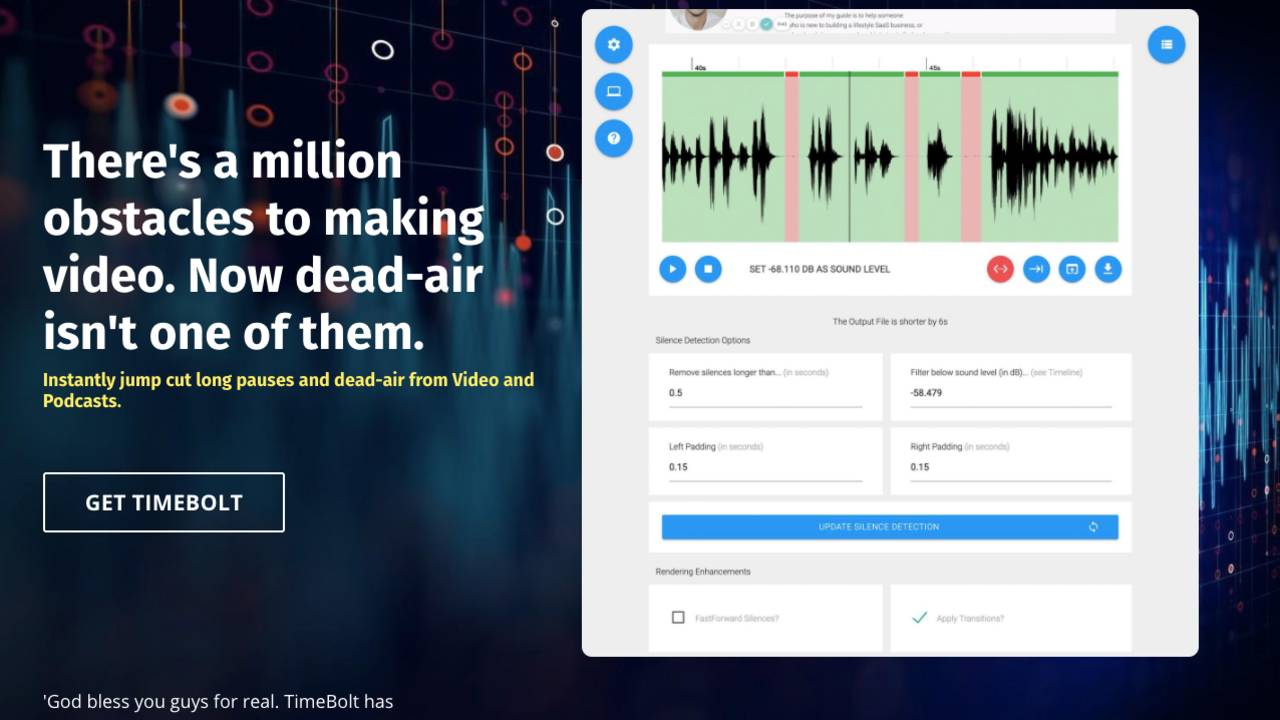
TimeBolt offers a swift and intelligent solution for editing long videos and podcast timelines, ensuring your content captures and retains audience attention. This rapid video editor excels at removing unwanted silence, accelerating scenes, and swiftly eliminating errors, transforming editing from a hours-long process into one that takes just seconds.

$17.00

Plan:

TimeBolt offers a swift and intelligent solution for editing long videos and podcast timelines, ensuring your content captures and retains audience attention. This rapid video editor excels at removing unwanted silence, accelerating scenes, and swiftly eliminating errors, transforming editing from a hours-long process into one that takes just seconds.

As a desktop application, TimeBolt allows for immediate work on videos without the need for uploading files, sidestepping limitations on resolution (up to 1080p) and file size.

The app enables previewing of video and audio at speeds up to 4x, allowing for quick edits with a simple keystroke to remove retakes, specific words, or entire scenes. It offers functionality to speed up scenes, add smooth transitions, loop background audio seamlessly, and includes a built-in screen capture feature, all while facilitating direct output to your desktop.

Designed with YouTubers and gamers in mind, TimeBolt supports exporting edited clips as XML files to FCPX, Davinci Resolve, or Adobe Premiere, accommodating multi-camera setups and multi-track audio to cater to a wide range of editing needs.


Reviews

There are no reviews yet.

Be the first to review “Timebolt”

Your email address will not be published. Required fields are marked *

  • Auto Remove Silence: Effortlessly eliminate silent sections and perform jump cuts on an hour's worth of video in just 48 seconds
  • Cut or Keep: Decide whether to cut or retain any word or scene while previewing video and audio at speeds up to 4x
  • Punch In/Out: Utilize the letter 'P' and arrow keys to direct focus and zoom in on specific areas of interest
  • Export: Directly render videos to your desktop or export them to Premiere, Final Cut Pro, DaVinci Resolve, and Camtasia for further editing
  • SpeedUp Features: Increase the pace of silent parts, loop background audio seamlessly, and incorporate transitions for a polished finish
  • Instantly edit smarter, more persuasive video so people don't zone out
  • Instantly cut dead air, speed-up scenes, and rapidly cut mistakes in seconds not hours.
  • Local Desktop App:ย  you don't wait for files to upload, limited to 1080P, or have file size limits
  • Preview video and audio up to 4x speed. Strike one key and cut retakes, words, and scenes.
  • Speed-up scenes, apply transitions, loop background audio, and output to desktop. Built-in screen capture as well.
  • Export clips XML into FCPX, Davinci Resolve, or Adobe Premiere.
  • Multi-camera and multi-track audio is supported!
 
  • YouTubers
  • Gamers

RELATED PRODUCTS

The NEW YORKER

Go beyond the headlines.

Subscribe for $1 a week, and get a free tote. subscribe
Cancel any time